Posts

Halleluya by Daniel

If you cannot see the audio controls, your browser does not support the audio element Song: Halleluyah Composer: Daniel Fadipe   Drums: Chukwuka Okonji Producer:  Emmanuel Fadipe I hope you enjoy this song and get blessed in the process.  Production by me with help from Victory Chapel Choir

Add Custom Controls To DataTable Rows

Image
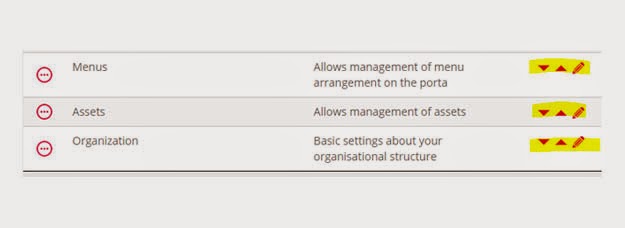
Background: datatables.js is a very awesome tool that enables data to be presented in tabular format (ASP.Net developers prefer to call this grid). Its currently the best free data-to-table tool available (my personal opinion). Since I ran into it, I immediately got stuck and cannot but use it in each of my projects. Issue: There are several issues with datatables.js. Many of them however stem from knowledge gap, because the tool is quite robust, it would take a long time to exhaust the documentation and fully learn the plugin. In my own case, I wanted to add custom controls to each datatable row. These three controls would be for ordering the row and editing the record. Solution: We would need images to use as these controls. I normally get images online sometimes. Although, I find it easier to create simple icons using CorelDraw. After fetching your data, simply loop through each item to add the html tag for your control image to the element. Finally, render the datatabl...

Specify Name for Uploaded File At Upload Time Using DropZone.js

Image
Background: After surmounting my last challenge with dropzone.js and was able to upload my files. I was immediately faced with another one. The dropzone.js implementation apparently doesn't include any method for computing a value to send to the server while the file is being uploaded. What this means is that any headers or form data used to initialize the dropzone will be used repeatedly each time a file is uploaded. Issue: This meant that, for instance if I didn't want to upload a file using its name from the client, I may not be able to specify another name for the file as it is being uploaded. And that was exactly what I was faced with. Each time I created another record and uploaded a corresponding file with the dropzone, the file would overwrite my previous files, because I was apparently sending the same custom filename to the server to save my files with. My dropzone initialization code looked like this var mydropzone = $(targetelement).dropzone({     ...

Post Data to ASP.NET Page From PHP or Javascript

Image
Background: For most PHP developers, the technique of posting data from one page to a different page is not a difficult thing. In fact, in PHP development, this technique is learnt by beginners. In ASP.Net however, it doesn't work the same way. The ASP.Net platform is designed to implicitly post data to itself and developers need not manually trap posted data themselves. Issue: This simplistic development approach implemented by ASP.Net poses a problem where one needs to for one reason or the other, post to the ASP.Net page from another ASP.Net page, a PHP page, from JavaScript or even Python, ruby, and any other server side platform you can imagine. In my own case, I was using dropzone.js to implement drag-and-drop file upload for an application. I would have to post to a server side platform using JavaScript. For some reasons, I didn't want to use PHP, even though PHP would work seamlessly. The platform available for me was ASP.Net, but remember; ASP.Net doesn't...
Retrieve Source Code from Compiled .NET Program

Image
Background I found myself in this mess. I wrote a lovely windows service to handle data replication between two SQL Servers. I know this isn't the best way to go about it, but the requirement came in late into the project and the database design wasn't going to support automatic replication provided by SQL Server, so I had to develop this windows service. Unfortunately, I lost the source code and backup in a robbery incident and I'm left with just the compiled version deployed with a client. Issue A bug showed up which needed to be fixed, but I didn't have the source anymore. I would have had to go through the stress of re-writing the entire code which took about a month to complete initially if I didn't run into this solution. I'm feeling great right now! Solution It happens that there are a couple of projects targeted at de-compiling .NET codes. I found two: 1 .NET Reflector 2. Just Decompile I tried the .NET reflector and it worked like m...

Enabling Write Access to A folder in IIS

Image
Issue Sometimes in web development, we may want to grant WRITE access to a folder probably for file upload purposes or mostly in my own case, PDF file generation purposes. The challenge however, is that all folders are read only which means your application will always throw errors whenever you attempt a write operation. Solution Locate the folder in windows explorer Right click on the folder and select properties In the securities tab, click edit, then click add in the new dialog box that shows up Type IIS AppPool\ApplicationPoolName (you need to replace ApplicationPoolName with the name of the application pool in IIS that your web app is running under) Click Check Names to resolve the name, then click Ok  Under permissions for ..., check Modify under allow.  Click Ok on all dialog boxes Note Some people will grant Modify or Full Control right to Everyone for the folder, note that this posses a huge security risk and should never be your approach to r...

Sweet Summernote

Image
Background If you ever wish to add WYSIWYG functionality to your web project, summernote.js is probably your best bet! It will convert your textarea control to a fully functional WYSIWYG control with ability to gain access to the content of the control in HTML format. Implementation To change a simple textarea control to a WYSIWYG control, $( '#summernote' ).summernote(); To fetch the HTML content of the control: var sHTML = $( '.summernote' ).code(); Wishing you all the best as you try this out.