Posts

ASP.NET Postback Problems

Image
Background First, I hope everyone knows that the form element in HTML is not a presentation tag but a functionality tag. I had to spell that out just so we are all clear. I've found that many web developers, me inclusive, often find ourselves entangled in usage of multiple redundant form elements on a page. Rather than clean out this clog, we simply leave it because " it after-all causes no one harm ". I was soon to to learn otherwise ... I was redesigning the interface for a legacy ASP.NET 3.5 webforms application ( only God knows how we survived the ages when this technology was the de-facto. I so much hate the tight coupling between then presentation and logic layers ). In order to jump-start the work, I quickly pasted the HTML from a previous project into the master page and updated the CSS and JavaScript references, then I copied the form tag including all the Content Placeholders from the old master page into the content area. After this, I noticed I ...


Exception from HRESULT: 0x80131040

Image
Background: I just recently upgraded to Windows 10, and I must confess, the overall experience immediately got me. I love the fact that our good old start menu was back and better. The tile one was much of a controversy although I have been indifferent about it all the while. I particularly love Cortana, the search assistant who made me remember the office assistants that used to come with the office suite back then. The euphoria I experience was a perfect disguise, however, for the ambush that was ahead. Issue: I went ahead to open VisualStudio and launched the project I was currently working on. I pressed F5 to launch it, only to ram into a jam! The project I still successfully tested only a day before now threw an exception. From my experience, and this situation hasn't proved me wrong, every Microsoft upgrade always has a catch somewhere. This particular one forced me to begin to rectify a fault in an application that was initially 'bug-free' before my u...

Collapsible Widgets

Image
Small Feature, Excellent Idea Collapsible Widgets are a simple feature that can easily make a site or application exciting. It could just be the simple thing that adds that wow effect to your project. You can hardly find any of my work where this isn't implemented. All these projects; asset.bz , a1school.net , buysellairtime.com and many others proudly fly the banners of this wonderful feature. Collapsible widgets also provide an avenue for front-end flexibility and space management Implementation I won't bore you with any more rants, lets get down to how you can get this implemented. First you add two html elements, an header and a div  like we have below <div class="panel"> <header class="panel-heading"> Widget Header Text </header> <div class="panel-body"> </div> </div> In order to make things a little more exciting, you may also want to include the following...

Get Creative With Data Tables: Row Click Events

Image
Introduction Datatables from datatables.net are so lovely, especially with the responsive extension that you can enable by including dataTables.responsive.js in your project. I particularly find fascinating the combination of search / filtering, pagination, ordering and exporting features which are available right 'out-of-the-box'. Issue Well, as great as datatables are, you will find it difficult if not impossible to develop a system with acceptable user-experience using bare-bone datatables implementation. In my own case, because I was porting my superb Asset and Inventory Management Application found at asset.bz to the mobile platforms using PhoneGap, I needed the user to be able to tap on any record in order to perform some pre-define operations like editing, approvals etc. Solution Apparently, the solution isn't far fetched. The sample code below would do the job nicely: // HTMLTableData is your array of records to be displayed in the data table ...

Asset.bz Asset / Inventory Management Project

Image
I have found out through my own experiences and that of others, how difficult it is to get ‘sincere’ applause at the end of demo of any beta version software. Yes, you would always get some form of applause, but rarely the ‘sincere’ ones. Software demo for new products in my organization usually has in attendance several employees from different units and departments. Many attend on the basis of obligation while others are just too busy in their heads to give the session the attention it would require in order to appreciate the product being presented. I had to send out reminders to get invitees to leave their seats for the demo of a new product my team just developed. It’s a team of 2, and while I worked at the Front-end with design, branding and development along with the accompanying Mobile App, my partner was in charge of the web services and SQL Server database development. We would be anchoring the demo together, and I was to start the session. We were to receive an ap...

Halleluya by Daniel

If you cannot see the audio controls, your browser does not support the audio element Song: Halleluyah Composer: Daniel Fadipe   Drums: Chukwuka Okonji Producer:  Emmanuel Fadipe I hope you enjoy this song and get blessed in the process.  Production by me with help from Victory Chapel Choir

Add Custom Controls To DataTable Rows

Image
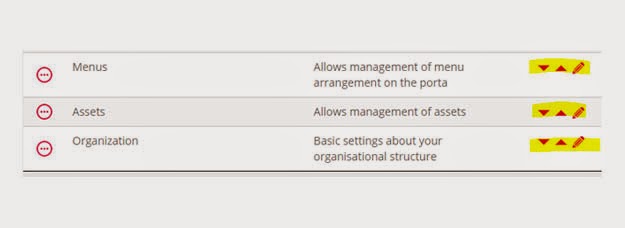
Background: datatables.js is a very awesome tool that enables data to be presented in tabular format (ASP.Net developers prefer to call this grid). Its currently the best free data-to-table tool available (my personal opinion). Since I ran into it, I immediately got stuck and cannot but use it in each of my projects. Issue: There are several issues with datatables.js. Many of them however stem from knowledge gap, because the tool is quite robust, it would take a long time to exhaust the documentation and fully learn the plugin. In my own case, I wanted to add custom controls to each datatable row. These three controls would be for ordering the row and editing the record. Solution: We would need images to use as these controls. I normally get images online sometimes. Although, I find it easier to create simple icons using CorelDraw. After fetching your data, simply loop through each item to add the html tag for your control image to the element. Finally, render the datatabl...